

Search
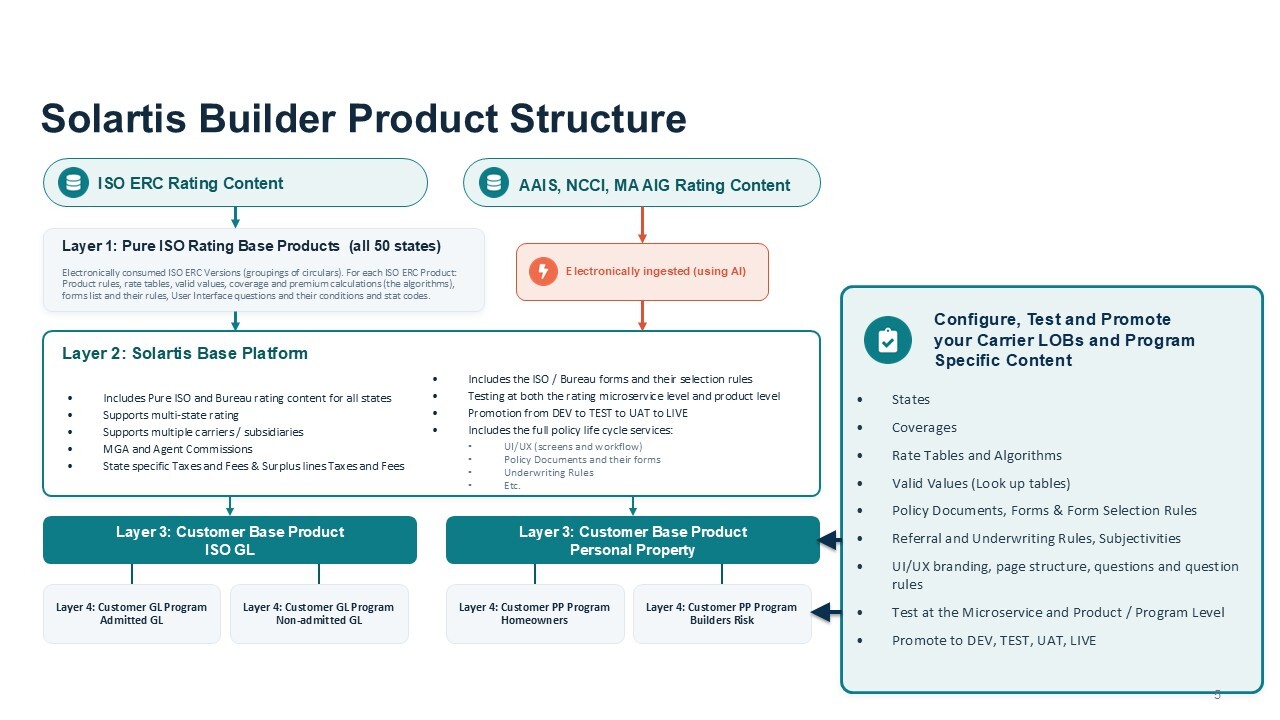

Insurance products are configured and maintained in Solartis Builder, our low-code configuration toolkit that accelerates insurance product deployment and maintenance. Business users can configure and manage every aspect of their P&C personal, commercial, and E&S product lines — including states, coverages, rates, rules, UI/UX, policy documents, and forms — within a single environment that supports development, testing, and production.
With full version control and built-in testing at both the microservice and product level, teams can make and promote changes quickly and confidently without heavy IT or DevOps reliance. This streamlined, business-driven process ensures rapid response to market needs and continuous speed to market.
Yes. The Solartis Builder toolkit was designed to support collaboration across business and technical teams. Multiple teams can work concurrently on different aspects of the same insurance product — for example, one team may focus on rating logic, another on underwriting rules, and a third on document and form configuration.
Each team can independently test their work at the microservice level, enabling targeted validation and faster iteration. Once individual components are finalized, full product-level testing is performed prior to deployment. This approach enables parallel configuration, testing, and deployment, reducing time to market while maintaining control and compliance.
The Solartis platform is built on a headless microservice architecture, giving customers full flexibility in how the business user interface layer is implemented. Customers can choose to:
This flexible approach ensures carriers, agents/brokers, and consumers each have user interfaces tailored to their specific needs and workflows.
Solartis Builder was designed for both technical and non-technical users, enabling business analysts to configure and maintain their insurance products without IT dependency. In Builder, users can manage states, supported companies, commissions, plans, eligibility and underwriting rules, referral rules, notifications, policy transaction numbering formats, coverages, rate tables, algorithms, documents, and forms.
Builder can also author forms, configure UI/UX screens and question logic, run microservice- and product-level testing, and promote changes seamlessly from DEV to TEST to LIVE. This empowers business teams to adapt products quickly while IT focuses on governance and integrations.
The Solartis platform offers robust functionality for managing all forms used across policy documents throughout the policy lifecycle, ensuring accuracy, control, and flexibility. Forms are categorized as mandatory (always included), conditional (added when configured rules are met), or optional (available for manual selection).
All forms — ISO, AAIS, proprietary, and carrier-specific — are centrally managed in the Solartis Builder Forms Library, which supports sharing across product lines, grouping, prioritization, rules-based selection, and version control. Proprietary and manuscript forms are authored in Microsoft Word with the Solartis Editor Plug-in, which enables dynamic data insertion. Policy documents such as quotes, binders, policy packets, endorsements, and renewals are built in Builder as collections of forms, with configurable order and version management.
During each policy transaction, the Solartis UI presents a dedicated forms screen. Mandatory and conditional forms are automatically added to the policy, while optional forms (including manuscript and fill-in forms) are available for manual selection. Users can preview or download forms, add or remove them, and reorder them to control the output sequence in the final policy packet.
This structure gives underwriters and operational users a compliant yet flexible way to tailor policy content while staying within the governance framework defined in Builder.
Solartis consumes ISO Commercial Lines content — including rules, rates, forms, and statistical codes — directly into the platform, and Builder allows carriers to configure their own exceptions and deviations.
Examples include carrier-specific coverages, rate deviations such as surcharges or proprietary tables, proprietary forms, and carrier-specific rules like state eligibility or underwriting logic. These deviations are layered on top of the ISO baseline so the original content is preserved, ensuring compliance with ISO standards while allowing carriers to differentiate their products in the market.
Yes. In Solartis Builder, every change is tagged with applicable and effective dates, and all prior versions remain available for policy processing. Carriers can configure whether transactions always use the rate in effect at the time or allow grandfathering of prior rates. Version control applies across all product components—programs, states, rules, commissions, coverages, rates, and forms—ensuring accuracy, compliance, and uninterrupted operations as products evolve.
Testing and deployment are integrated directly into Builder, eliminating the need for external DevOps cycles. Users can run microservice-level tests (for example, rating calculations, document generation, and underwriting rules) and full product-level tests simulating end-to-end policy transactions. Once approved, changes are seamlessly promoted from DEV to TEST to PROD environments. This built-in framework ensures accuracy, reduces release cycles, and enables carriers to respond quickly to market needs.
Most day-to-day updates can be handled by business analysts in Solartis Builder, but some scenarios require technical expertise. These include complex third-party integrations, API orchestration beyond standard microservices, custom UI/UX design, and enterprise-level deployment or security requirements.
Builder is designed so business teams manage rating, rules, forms, workflows, and UI independently, while technical teams focus on integrations, governance, and advanced customizations—ensuring the right balance of agility and control.

